

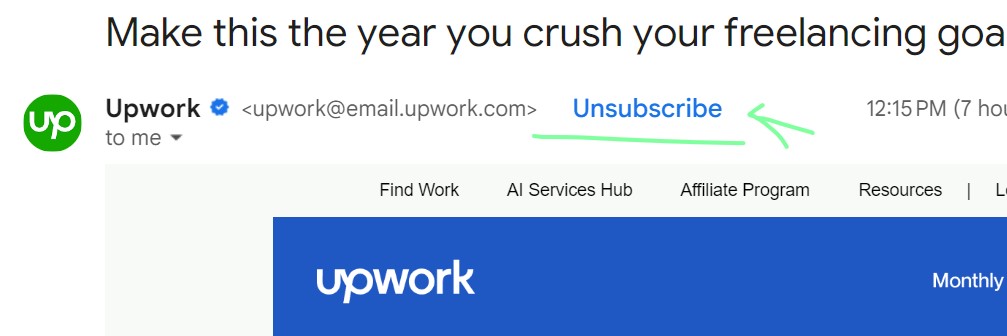

Have you seen One click Unsubscribe header emails lately?

Introducing the One-Click Unsubscribe Email Feature: Say Goodbye to Hassle!
Are you tired of wasting time unsubscribing from unwanted emails with multiple steps? Say hello to convenience with the One-Click Unsubscribe Email Feature! Designed to simplify the unsubscribe process, this feature puts you in control, saving you time and frustration.
How Does It Work?
- Spot the Unsubscribe Link: Keep an eye out for the “Unsubscribe” link at the bottom of emails you no longer wish to receive.
- Click Once: With just a single click on the unsubscribe link, you’re done! No more navigating through multiple pages or filling out tedious forms.
- Confirmation: You may receive a confirmation message to ensure that you intended to unsubscribe. Simply confirm, and you’re unsubscribed.
Benefits You’ll Love:
- Save Time: No more wasting time searching for the elusive unsubscribe button buried in emails.
- Reduce Clutter: Streamline your inbox by effortlessly removing unwanted emails with a single click.
- Customize Preferences: Easily manage your email preferences and tailor your inbox to suit your needs.
Integrate One-Click Unsubscribe with Your Business:
- Update Email Templates: Ensure that all your email communications include a prominent one-click unsubscribe link at the bottom.
- Use email marketing platforms with one-click unsubscribe functionality to automate processes and make it easier for both you and your recipients.
- Monitor Feedback: Pay attention to unsubscribe rates and feedback to continuously improve your email communications and tailor them to your audience’s preferences.
Don’t let unwanted emails clutter your inbox any longer. Embrace the simplicity and efficiency of the One-Click Unsubscribe Email Feature. Save time, reduce clutter, and customize your email preferences with ease. Click away the hassle and enjoy a cleaner, more organized inbox today!
Ready to streamline your email experience? Try out the One-Click Unsubscribe Email Feature within you own ESP!
The email one click unsubscribe header is a component located in the header section of an email. Its purpose is to include an “Unsubscribe” link or button in the email client’s interface. This new 2024 ruled valuable addition allows recipients to easily opt out of future emails without having to search for an unsubscribe option within the email.
To unsubscribe from an email list, you usually have to click on an unsubscribe link. This will take you to a page where you can easily confirm your decision.
Unsubscribe headers enhance the process, making it more convenient. By simply clicking the unsubscribe button in your mailbox, you will be promptly removed from the mailing list.
Unsubscribe headers make it easier for email users to opt out of unwanted emails. This helps to reduce the clutter in their inbox and provides a smoother user experience overall.
From February 2024, Google and Yahoo will require a one-click list-unsubscribe header for marketing emails, making it easier for subscribers to opt out. Most emails already include this mechanism by default, ensuring compliance with the new requirements from Google and Yahoo.
What are the technical Online click unsubscribe rules?
RFC 8058
A List-Unsubscribe email header field [RFC2369] can contain HTTPS [RFC7230] URIs. In that header field, the HTTPS URI is intended to unsubscribe the recipient of the message from the list. But anti- spam software often fetches all resources in mail header fields automatically, without any action by the user, and there is no mechanical way for a sender to tell whether a request was made automatically by anti-spam software or manually requested by a user. To prevent accidental unsubscriptions, senders return landing pages with a confirmation step to finish the unsubscribe request. A live user would recognize and act on this confirmation step, but an automated system would not. That makes the unsubscription process more complex than a single click.
https://datatracker.ietf.org/
Mail Sender
To enable recipients to easily unsubscribe with just one click, mail senders include a List-Unsubscribe header field and a List-Unsubscribe-Post header field in the message. The List-Unsubscribe header field must have an HTTPS URI and may also include other non-HTTP/S URIs.
MAILTO:. The List-Unsubscribe-Post header MUST contain “List-unsubscribe=One-Click”. The message MUST have a valid DKIM signature covering the List-Unsubscribe and List-Unsubscribe-Post headers.
The URI in the List-Unsubscribe header is important because it must contain enough information to identify the email recipient and the specific mailing list they want to be removed from. This ensures that the Un-subscription process can be completed automatically without the need for manual intervention.Do not allow any additional POST arguments. Instead, put all the information in the URL. It is not feasible to request unsubscribe information from the user with a single click.

Mail Receivers
To unsubscribe, simply send an HTTPS POST request to the URI mentioned in the List-Unsubscribe header. Include the key/value pair in the List-Unsubscribe-Post header as the request body.Send the content using ‘multipart/form-data’ or ‘application/x-www-form-urlencoded’.

Web browsers use these encodings when sending forms. The target of the POST action is the same as the one in the GET action for a manual unsubscription, enabling the same server code to handle both. It is crucial that the mail receiver does not perform a POST on the HTTPS URI without user consent. The process of obtaining user consent is not specified here.




Leave a Reply